Monday, September 27, 2010

The Last Page by Anthony Huso


The Last Page is a glorious fantasy novel set in a steam-punkish Lovecraftian world. The new king of the duchy of Stonehold inherits an imminent war, and a cast of characters ready to advise and mold him into something that suits their needs.

Caliph Howl, a long time student learns everything he can about the duchy as quickly as he can. His ability to plot and strategize serves him well, but the seething city of Isca with its wonderfully named sections such as Three Cats, Ghoul Court, Murkbell and Lampfire boggles the imagination and provides him with unlikely enemies and allies.

There is a sisterhood of witches who are spies and assassins, and the most promising new talent in their cadre is obsessed with Caliph Howl for many reasons.

The world operates on magic and logic and mathematics.

There is a secret book called Cisrym Ta which is sought by all. Caliph Howl is its key.

When you turn the last page, you will want to know more about the city of Isca and its people, and having spent four hundred and fifty pages hoping for victory for Caliph and Sena, you will be sad and happy at the same.

You will be pleased to know that a sequel is in the works. I'm hoping the author is writing very very quickly.

Visit Anthony Huso's Site.

Wednesday, September 15, 2010

Survivor Nicaragua: new night, new challenges


I always love Survivor, but this time out, the survivors will be split by age. The youthful beach lounging types will have to go after their fellow loungers instead of picking off the more well seasoned players.

Those thirty and below are on one team and those 40 and above are on the other. This can work even with physical challenges, I think, because it isn't just the pure physical stamina that wins, it is teamwork and competitive spirit.

It will be interesting to see which team has the stronger desire to show what they've got and the ability to work together to pull it off.

Survivor moves to Wednesday night this season, so grab your chair, your beagles and a cool can of pop and watch the fun!

Tuesday, September 14, 2010

Kindle


I've decided to enter the 21st Century as a reader and get a Kindle. One of our mystery book group readers has one and was quite enthusiastic and a staffer has one (and generously showed it to me) and with the new low Kindle price, perhaps the time is now.

One thing our staffer said that I liked alot was, if the price of a Kindle edition and the actual book are close, she gets the book. I love books and have too many, but what is life for?

Why get one at all, you say? I see lots of authors putting their own out of print titles out as Kindle Editions. It seems like wonderful opportunity to own some of those things you just can't get anymore.

In cases where you need a book for your book group fast and the waiting list at the library is over 400 people...zip, it is yours.

Also, since I learned about the Book View Cafe, I have wished that I could get some of those nice works of science fiction and fantasy right from a nice author consortium.

Monday, September 13, 2010

This Week in Dakota County

Thanks to a pal, I am now reading This Week in Dakota County regularly. It does a great job of covering local Dakota County cities and it is covering the budget situation for our county, which affects everyone who lives and works there.

Keep up with all the latest at the This Week newspapers site.

Sunday, September 12, 2010

Just. Buzz. Off.

Buzz Off! according to the Online Slang Dictionary means:

To go away. Origin: from onomatopoeia "buzz", the sound an insect makes, implying that the person addressed is annoying and should leave.

I used to use that phrase all the time, in the 1980s or so when it was popular. It has a nice ring to it. Short, sweet.


Imagine my delight when I found a new author named Hannah Reed, who was in the process of writing and publishing a new mystery called Buzz Off: a Queen Bee Mystery.

I was able to get past my mixed feelings about bees (love them for my plants, dodge them for the possibility of being stung).

Hannah is full of sass, style, and has more wise things to say on any given day than most of us ever think of.

Her book is set in the small town of Moraine, Wisconsin. Hello, neighbor! Story Fischer runs a wonderful store in a refurbished church. It has basic groceries items and stock from local orchards and farms, Wisconsin wines and cheese, and honey, that wonderful bit of gold. Everyone stops in at Storey's store.

As a hobby, Storey is learning beekeeping from her friend Manny Chapman. When the police pull up during her National Honey Month open house, she is shocked to find they want her to come to Manny's farm to help them. Manny has been found covered in bees. Someone needs to get the bees off of him so that he can be examined. Storey is that someone.

Since the bee blower is suspiciously missing, Storey uses a fan to remove them from Manny. Once he is pronounced dead, she immediately has to defend the bees and their hives. Locals want them destroyed. Bees leave their stingers in a person then die, reasons Storey. Yellow jackets do not and could sting over and over. It had to be yellow jackets.

How to prove this before the hives are destroyed, or sold to a mysterious beekeeper nobody ever heard of but who has suddenly appeared? The hives Storey keeps in her backyard are soon under siege from fearful neighbors. The journal Manny meticulously kept on his bees is missing.

More deaths occur and only Storey seems to make the connections to Manny's death. This is a well thought out mystery. I considered that just about everyone but the actual killer could be guilty.

I loved the town and its characters. Although Storey is trying to get over her sleazy ex-husband, he's her neighbor. Her high school sweetheart is buzzing around, as is the high school bully who might have a crush on her.

A rumor mongering neighbor with a telescope keeps an eye on everyone. Nobody likes a gossiping snoop, but Pity-Party Patti shines, seemingly believing most of what she makes up herself.

Storey's disapproving mom is always threatening to come and show Storey how to run the store and her life the Right Way. Good thing Storey's grandma is around to hip-check mom out of the way.

The local LIBRARY figures nicely into the plot. Dang those people sending out wierd messages from library Internet computers!

Recipes are at the back of the book making this one sweet read.

Visit Hannah Reed's Queen Bee Mystery Page
to learn more about bees, honey, and this great new series.

Find Hannah on Facebook

Hannah's alter ego is Deb Baker. Well, maybe Hannah is the alter ego since Deb is the real person and Hannah is a cute lil bee, as far as we can tell.

Friday, August 27, 2010

How to get a free Google e-mail account

Google Mail

You need an email account to do just about anything these days. Gmail is free and can be opened from any computer anywhere that has access to the Internet. A place like your local library!

Gmail is a good choice for anyone, especially a beginner. Sign up is easy, the interface is simple, and there are no annoying ads tacked onto your emails.

Before you begin, write down three possible sign in names that you'd like to use, and three possible passwords (making sure your password is at least 8 letters or numbers long). If you're prepared with these, the sign up process will be much smoother. Be SURE to write down which one you end up with.


Click to enlarge to view this sample Gmail sign up form
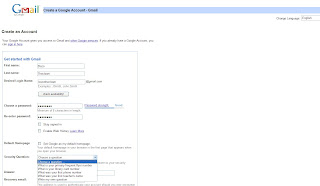


How to sign up:

Go to www.google.com

Click on Gmail on the upper left of the screen

On the right side click on Create an Account

You’re presented with a form to fill out. Click inside the boxes to enter information in each box.

Before you begin, think about what you want your login name to be. Keep in mind that millions of people use Gmail and it is very likely that the name you wish to use is already being used by someone else.

Write down a few variations. Consider adding another short word or a number to your name so you’re ready to try something different if the name you want is in use.

Your password has to be 8 characters long. This can include letters and numbers. If you try to use something shorter, your account won’t be created until you make the change.

Here is what is on the form:


First Name

Last Name

Desired login name (the name that you will use to log into Gmail and this will be the first part of your gmail address as well)

Check availability (click here to see if your username is in use or not)

Choose a password (notice as you type this in that you can see if someone might easily guess your password or not on the password strength meter)

Re-enter Password (just type in your password again.)

Stay signed in (click in the box next to this to remove the check mark. For your own security, do not stay signed into your email)

Enable Web History (Uncheck this box. You do not need an extra layer of a website remembering where you have been on the web.)

Default Homepage (uncheck this if you have a homepage that you find useful. This is the web site that is displayed whenever you open the Internet.)

Security Question (The security question allows you to access your account if you forget your username or password. Click on the arrow next to this box to choose a pre-set question or write your own.)

Recovery email (You can leave this blank, since this is probably your only email account)

Location (Use the arrow next to this box to choose the country you’re in)

Birthday (Make sure you enter your dates in the format they suggest below the box)

Word Verification (you will need to type in the scrunched up word you see on the screen in the space below. You will not need to use capital letters, but you must be accurate. These are often very hard to read.)

Terms of Service (Read the account agreement by scrolling down through the text box)

I Accept (Click on this)

Once you click on I Accept, you should get a screen that welcomes you to Gmail.

If there are any boxes that were not filled in correctly, you will be presented with the application form again.

Look at the form and read what is written in RED beneath any box or field. Make the suggested corrections.

Note you will always need to fill in your password again, uncheck the boxes for staying signed in, etc. You will need to do another Word Verification, and it will be a different word this time.

Click Accept and hopefully it works this time!

You’re on your way.

Monday, August 2, 2010

On the Desk: Gee I don't want e-mail!


Many people who come to the library to use our computers do not have any experience using computers. The don't like computers. They don't want to use them. They sure don't want to have an email address.

In our online world, you may need one to buy cars, airline tickets, do much of your banking, make mortgage payments and other utility payments (at the last minute!), get coupons for bottled water, casinos, clothing. It is the only way the immigration office schedules appointments. Many many agencies and businesses are forcing people to go online.

Those agencies are not there to help the forlorn new computer user, but we are. People with no computing skills are trying to do complex things and you just have to walk them through as best as you can. Many times people want you to sit down at the computer and fill out forms, create accounts and we cannot. We are ever and always short staffed, and we have to respect the privacy of the individual and we can't know their personal information. It can be a real struggle.

The long and the short of it is, if you want to do anything online that requires an e-mail address, you need to create and use an e-mail address. They are free, they are easy to set up and use. Anyone can have one whether they have a computer or not.

Instructions for setting up a Gmail account forthcoming!

Wednesday, July 28, 2010

On the Desk: Print Preview


Click the arrow to see panel 2

Just when you think most customers have mastered the use of Print Preview in Internet Explorer, someone comes roaring up to the desk outraged that "The Computer" printed out a bunch of mostly blank sheets of paper.

Many will let you calmly show them how to use Print Preview to get an idea of what their printed pages would be, and then select only the pages they want.

Some people just aren't willing to even think that the "Evil Computer" or better yet the library staff, those wily "I've got my hand in your coin pocket" types aren't out to get them. They won't listen and they argue and argue. Ouch.

So...

Select File

Select Print Preview

Use the arrows on the preview page to see how many pages there are and what is on them.

When you know what you want, click on the Print icon on the upper left corner of the Print Preview page.

When the Print Dialogue box comes up note Page Range.

All is selected by default.

Click in the "Pages" radio button and type in the range of pages you want to print out. Say your web page had three pages but only pages 1 and 2 have information on them. Page three is just the web site address or some small bit of useless text.

In the Pages box, type 1-2. Page three will not be printed and you've saved money and you get a gold crown for not yelling at the librarian.

Sunday, July 18, 2010

I write like Ray Bradbury...in another dimension!


I write like
Ray Bradbury

I Write Like by Mémoires, Mac journal software. Analyze your writing!


Via Rosemary Honnold on Facebook. I couldn't resist this. My favorite post here is my Dear Ray Bradbury entry. Almost certainly they picked his name out of the post and voila! Still, if I could write at all, he would be the one I would emulate.